The Spy in Your Hand
Did you know your mouse movements can reveal your biological age or health conditions? Discover how websites analyze your physical motor skills.

Have you ever tried to click a 'Back' button and missed? Or maybe you hovered over a 'Buy' button for a few seconds, debating whether you really needed that new gadget? I recently set up the privacy-focused analytics tool Rybbit on my own infrastructure to see what visitor data I could keep out of the hands of big tech. But while playing with the custom event tracking, I realized something unsettling: we aren't just leaking metadata; we are leaking biology.

The Mouse as a Biometric Sensor
We tend to think of privacy leaks in terms of cookies, IP addresses, and user agents. But the way you physically move your mouse is as unique as a fingerprint and as revealing as a medical chart.
There are studies suggesting that the micro-tremors in a hand moving a mouse can correlate with early stages of Parkinson’s disease (typically oscillating around 5Hz). Similarly, the "efficiency" of the path you take—whether you move in a straight robotic line or a chaotic, indecisive curve—can reveal your age or cognitive state. A young gamer snaps to a target; an older user might slide, pause, and correct.
Using a simple JavaScript implementation and a standard analytics tool like Rybbit, we can extract this health data without the user ever explicitly submitting it.
The Concept: Efficiency and Hesitation
To turn a movement into data we can analyze, we need to boil down the chaos of mousemove events into concrete metrics. We don't need to stream every pixel to the server (which would kill performance and privacy). We can calculate the "diagnosis" right in the browser and just send the result.
We will look for three things:
- Tremor (Path Efficiency): We compare the actual distance the mouse traveled against the shortest possible distance (Euclidean distance). If the user moved 500 pixels to cross a 100-pixel gap, they are shaking or struggling.
- Hesitation: Did the cursor enter the target area but wait before clicking? This indicates cognitive load or doubt.
- Speed: How fast was the reaction?
The Implementation
I've created a script that attaches to specific buttons—like the 'Back' buttons on my English and German landing pages. It records the trajectory only when the mouse is moving towards the goal, analyzes it locally, and sends a 'Health Check' event to Rybbit.
Here is the complete code. You can place this in your website's footer.
/*
 * M. Meister - Mouse Biometrics Analysis for Rybbit
 * Captures movement efficiency and hesitation before a click.
 */
(function() {
    // Configuration
    const targetSelector = 'a.back-button, button.analyze-me'; // Add your button classes here
    const tremorThreshold = 2.5; // Path is 2.5x longer than necessary -> Likely Tremor
    const hesitationThreshold = 600; // ms hovering over target before click

    let mousePath = [];
    let lastTime = 0;

    // 1. Efficiently record mouse movement (throttled to 50ms)
    document.addEventListener('mousemove', (e) => {
        const now = Date.now();
        if (now - lastTime > 50) {
            mousePath.push({ x: e.clientX, y: e.clientY, time: now });
            lastTime = now;
            // Keep memory low: only keep last 100 points (approx 5 seconds)
            if (mousePath.length > 100) mousePath.shift();
        }
    });

    // 2. Helper: Calculate Euclidean Distance between two points
    function getDistance(p1, p2) {
        return Math.sqrt(Math.pow(p2.x - p1.x, 2) + Math.pow(p2.y - p1.y, 2));
    }

    // 3. Helper: Calculate total path length traveled
    function getPathLength(path) {
        let total = 0;
        for (let i = 1; i < path.length; i++) {
            total += getDistance(path[i-1], path[i]);
        }
        return total;
    }

    // 4. Analyze and Send on Click
    document.addEventListener('click', (e) => {
        // Only trigger if clicked element matches our target
        if (!e.target.matches(targetSelector)) return;

        if (mousePath.length < 5) return; // Not enough data

        const endPoint = mousePath[mousePath.length - 1];
        const startPoint = mousePath[0];

        // Calculate Metrics
        const directDistance = getDistance(startPoint, endPoint);
        const actualPath = getPathLength(mousePath);

        // "Efficiency": 1.0 is a robot (straight line). High numbers mean shaking/curving.
        // We protect against division by zero with (directDistance || 1)
        const efficiency = actualPath / (directDistance || 1);

        const isTrembling = efficiency > tremorThreshold;

        // Check Hesitation: Time spent in the last 20% of the path
        const totalTime = endPoint.time - startPoint.time;
        // Simple heuristic: If the cursor was near the button for a long time
        const hoverTime = endPoint.time - mousePath[Math.floor(mousePath.length * 0.8)].time;
        const isHesitating = hoverTime > hesitationThreshold;

        // Construct the Payload
        const healthData = {
            tremor_detected: isTrembling ? "YES" : "NO",
            hesitation: isHesitating ? "YES" : "NO",
            speed_ms: totalTime,
            efficiency_score: parseFloat(efficiency.toFixed(2))
        };

        console.log("Biometrics captured:", healthData);

        // Send to Rybbit (if active)
        if (window.rybbit) {
            window.rybbit.track('Biometric_Scan', healthData);
        }
    });
})();
Visualizing the Data in Rybbit
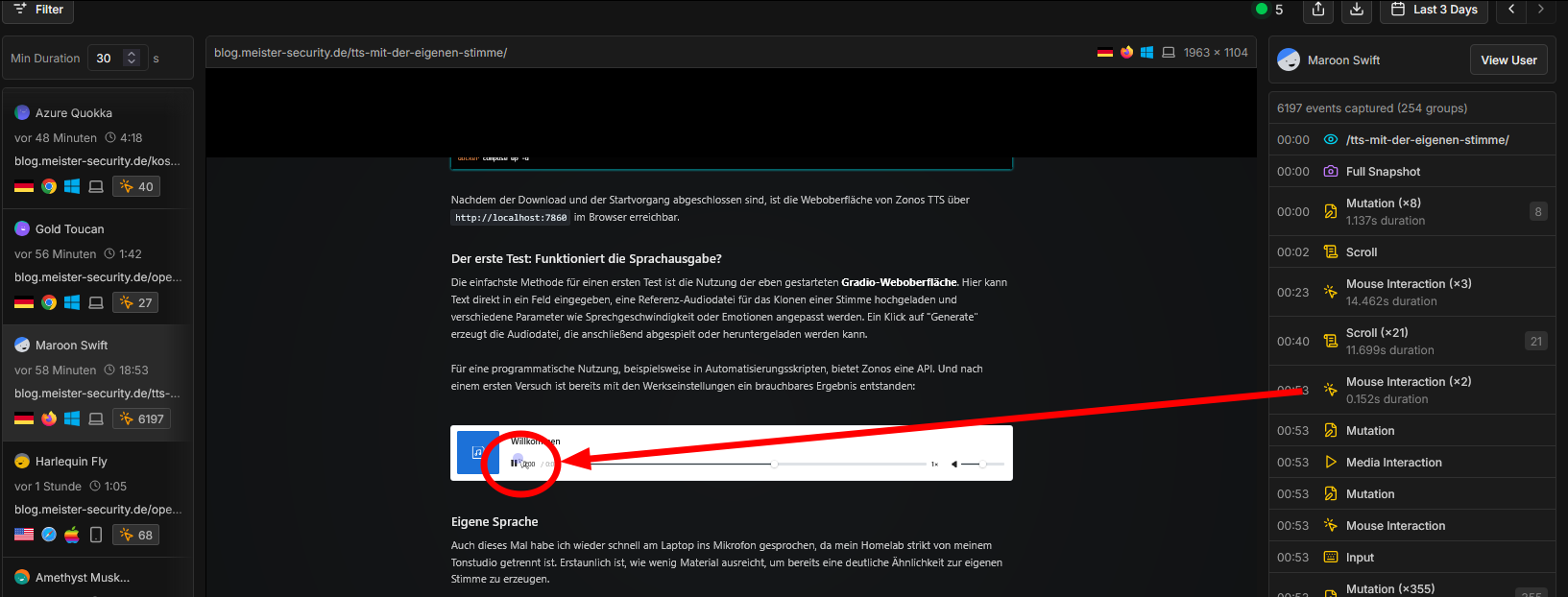
Once this script is live, you don't need a complex backend. Rybbit handles the ingestion. In your Rybbit dashboard, navigate to the Events tab. You will see a new event type called Biometric_Scan.
By filtering these events, you can build a terrifyingly accurate table:
| Username | Parkinsons ? | Hesitation | Path-Efficiency |
|---|---|---|---|
| Azure Quokka | 1.32 | ||
| White Anteater | 1.28 | ||
| Brown Spoonbill | 1.21 | ||
| Maroon Swift | X | 1.54 | |
| Harlequin Fly | 1.09 | ||
| Coral Hamster | X | 2.03 | |
| Coffee Parrot | 1.44 | ||
| Brown Goldfish | 1.27 | ||
| Plum Frog | 1.32 | ||
| Fuchsia Rattlesnake | 1.18 | ||
| Amethyst Muskox | 1.36 | ||
| Amethyst Canidae | X | X | 3.42 |
| Gray Dog | 1.12 | ||
| Cyan Egret | X | 1.79 | |
| Teal Wombat | 1.41 | ||
| Blue Thrush | X | 1.67 | |
| Emerald Ant | 1.25 | ||
| Maroon Bear | 1.13 | ||
| Lavender Chimpanzee | 1.34 | ||
| Teal Lobster | 1.27 |
The user with the score of 3.42 moved their mouse more than three times the necessary distance to hit the button. This is a strong indicator of a motor control issue, a poor input device, or a challenging environment (like a bumpy train ride). The user with 1.09 is likely a young person with a gaming mouse—or a bot.
Problems
I will say this: It was not so easy as it look at first glance. When I first tried to implement this, CORS prevented it from functioning. A solution like the one I presented in the article about protecting my whiteboard help to overcome the issue only to reveal the next one: Browser Ad-Blockers.
Brave, for example, played not well with the new html-code. The script crashed, because of privace-concerns, that was clearly visible in the browser-console (press F12, then console).
Touch-Devices didn´t even have "mouse-movement". So the results were overall restricted to a subset of visitors.
Conclusion
This experiment demonstrated that "privacy" is not just about what we type into forms, but how we physically interact with hardware. By combining simple JavaScript math with a privacy-focused tool like Rybbit, we can infer health conditions and age without the user's consent. It serves as a stark reminder that in the age of advanced analytics, our digital body language is speaking volumes, whether we want it to or not.