From Text to Heavy Metal: An Open Source Workflow
Forget subscriptions. Run a complete AI music studio on your own hardware with this guide.

High-quality AI music generation has long been the domain of expensive, cloud-based subscription services like Suno or Udio, leaving privacy-conscious users and local hosting enthusiasts in the silence. However, the release of ACE-Step 1.5 marks a significant turning point, bringing commercial-grade music generation directly to consumer hardware. A complete workflow has been tested, combining the lyrical creativity of a local LLM via Ollama with the audio synthesis power of ACE-Step to create a fully produced Metal track, all without sending a single byte to the cloud.
Creating music is the next step in my journey toward fully automated content creation.
 Michael Meister
 Michael Meister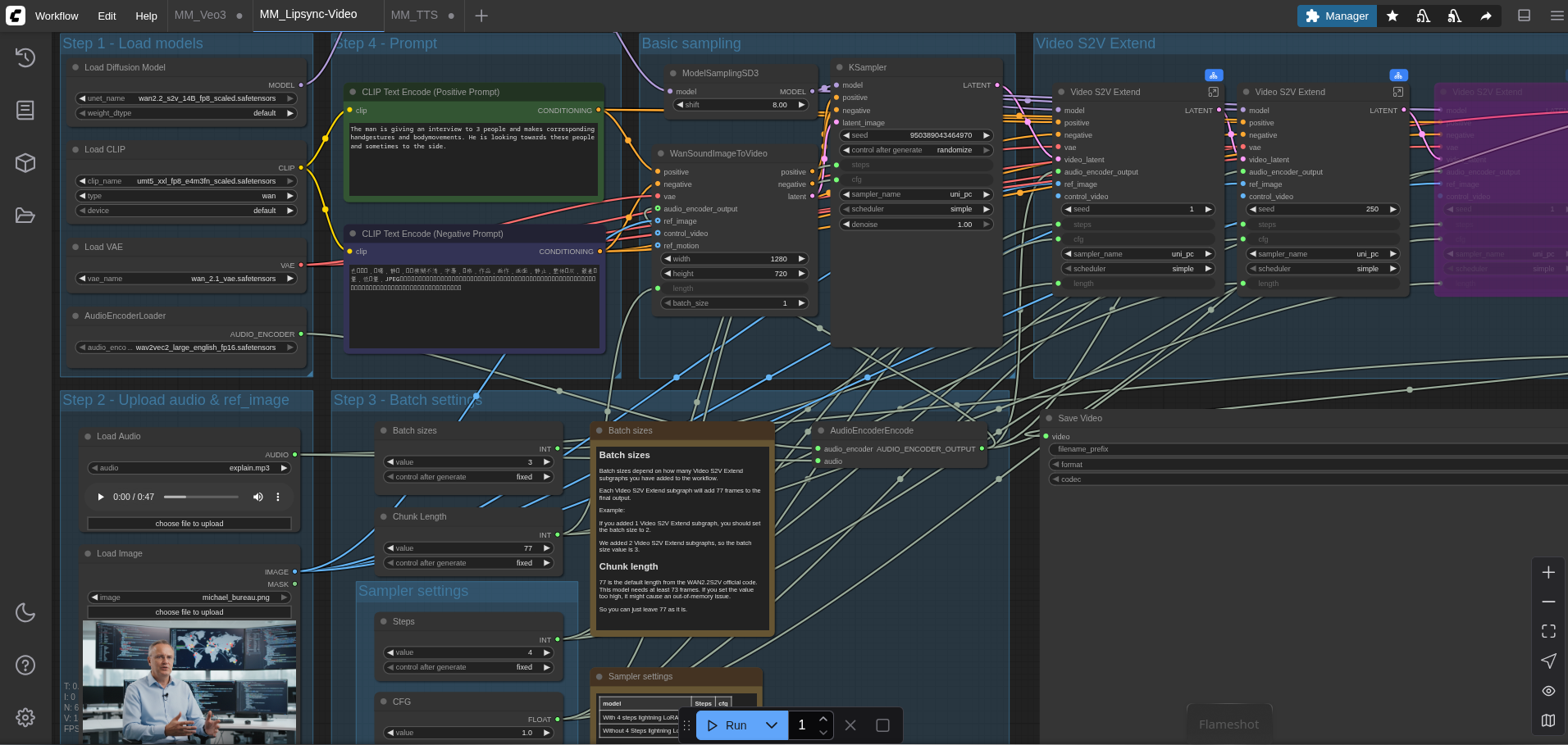
 Michael Meister
 Michael Meister
 Michael Meister
I encountered some re-encoding issues during the conversion for this website, but the original FLAC output sounded much clearer.
The Power of Local Music Synthesis
ACE-Step 1.5 is an open-source music foundation model designed to run efficiently on local machines. Unlike its predecessors that required massive data center GPUs, this model is optimized to run on consumer graphics cards, requiring as little as 4GB of VRAM for basic operations, though 8GB or 16GB is recommended for the larger language models.
The architecture separates the "thinking" (Language Model) from the "generating" (Diffusion Transformer). This allows the system to understand complex prompts and song structures - verses, choruses, and bridges - before turning them into audio spectrograms. The result is a tool that allows for "Chain-of-Thought" reasoning in music composition, ensuring that a "breakdown" actually sounds like a breakdown.
The Workflow: From Text to Audio
To create a song from scratch, a two-step "AI Chain" is utilized. First, a text generation model creates the structure and lyrics. Second, ACE-Step interprets these lyrics and the stylistic description to generate the actual audio file.
For this experiment, Ollama running the Qwen3 model was tasked with writing the lyrics. The goal was to create a "dark metal track blending heavy, down-tuned guitar."
Here is the exact creative input generated by the text model that will be fed into the audio engine:
Style Prompt (Caption):dark metal track blending heavy, down-tuned guitar.
Lyrics:
[Intro]
Shadows breathe beneath the skyline,
rusted hearts begin to hum.
In the silence of the distance,
every scar becomes a drum.

[Verse 1]
I walk through hours made of glass,
reflections whisper old confessions.
The ground is cold, the night is vast,
each step repeats my obsessions.

[Pre-Chorus]
The air burns slow,
as time corrodes my bones.

[Chorus]
I am the storm that never ends,
I am the wound that never heals.
Caught between faith and consequence,
this cage of thought I cannot feel.

[Verse 2]
Faces fade behind my eyes,
truth dissolves in static rain.
I drown within the lullabies
that promise comfort, then bring pain.

[Bridge]
A voice inside the void calls back my name,
a prayer, a curse — they sound the same.

[Final Chorus]
I am the storm that never ends,
I am the wound that never heals.
My shadow screams where daylight bends,
and silence teaches what is real.

[Outro]
Fade into grey,
where even memory decays.
Configuring ACE-Step for Generation
Installation is extremely easy. Just follow the official installation guide:
git clone https://github.com/ACE-Step/ACE-Step-1.5.git
cd ACE-Step-1.5
uv sync

# Use tis command to list more models
uv run acestep-download --list
# If you want to train LoRas, try the big install:
uv run acestep-download --model acestep-v15-base
Once ACE-Step is installed , the Gradio Web UI is launched via the terminal command uv run acestep.
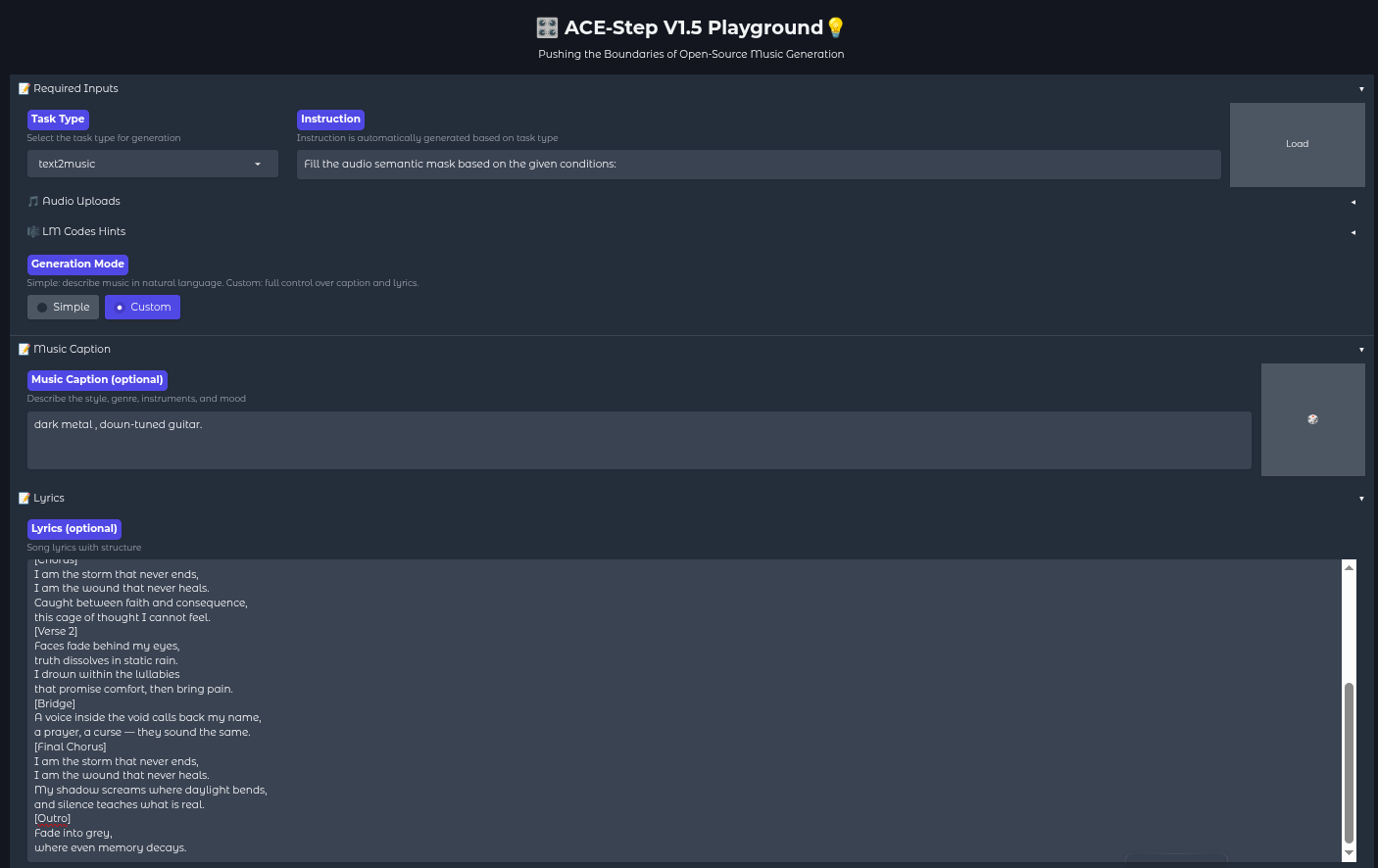
To transform the lyrics above into audio, the following configuration is applied within the web interface:
- Task Type: Select
text2music. - Generation Mode: Switch to Custom. This is crucial, as the "Simple" mode generates lyrics automatically, whereas "Custom" allows for the manual input of the Qwen3-generated text.
- Music Caption: The phrase
dark metal track blending heavy, down-tuned guitaris entered here. This guides the diffusion model on how the instruments should sound. - Lyrics: The full block of lyrics shown above is pasted into the lyrics field. The structural tags (like
[Chorus],[Bridge]) are vital, as ACE-Step reads these to change the energy and flow of the music dynamically. - Model Selection: For the best balance of speed and quality, the
acestep-v15-turbomodel is often used for the main model path.
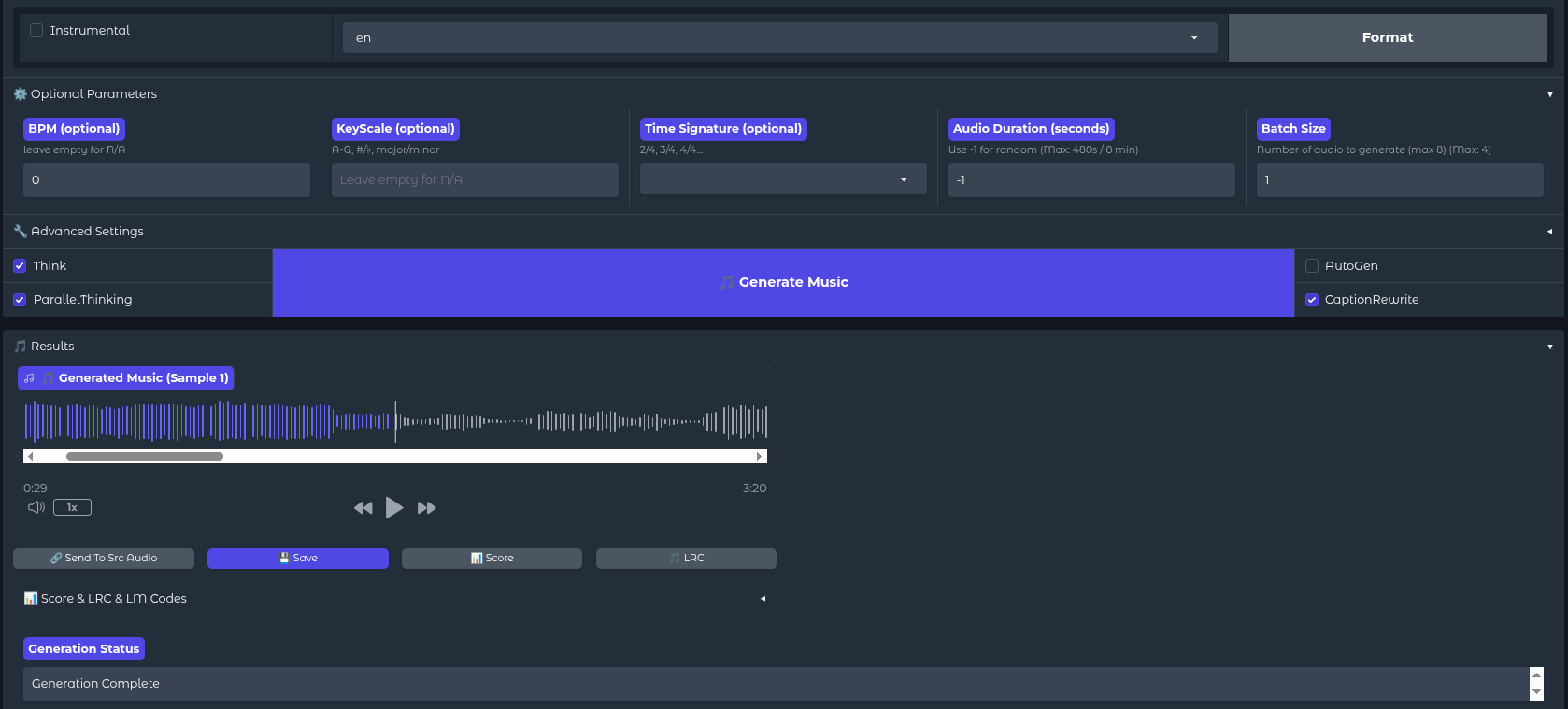
Fine-Tuning the Output
Before hitting "Generate," a few advanced settings can be tweaked to ensure the track doesn't cut off prematurely or sound disjointed.
- Audio Duration: Since Metal tracks with intros and bridges tend to be longer, the duration should be set to around 200-240 seconds.
- Batch Size: Setting this to 2 or 4 allows the generation of multiple variations simultaneously. AI generation involves a degree of randomness; one version might feature a clean vocal intro, while another might start with a guttural scream. Having options is preferable.
- 5Hz LM Model: Ensure the "Initialize 5Hz LM" box is checked. This loads the secondary language model responsible for the "Chain of Thought" processing, which drastically improves how well the music aligns with the lyrical structure.
Once configured, the Generate Music button is clicked. On an RTX 3090 or similar hardware, a full song can be generated in under a minute - significantly faster than real-time playback.
Cover: Reinterpreting Existing Songs
Cover mode generates a new version of an existing song in a different style or with a different vocal approach.
It it useful to:
- Transform genre (pop → metal, ballad → EDM)
- Change arrangement style
- Alter vocal tone or delivery
- Experiment with stylistic reinterpretation
- Concept demos
- Creative reinterpretations
- Style transfer experiments
- Testing alternative arrangements
It allows to explore “what if” scenarios quickly and at scale.
Automation
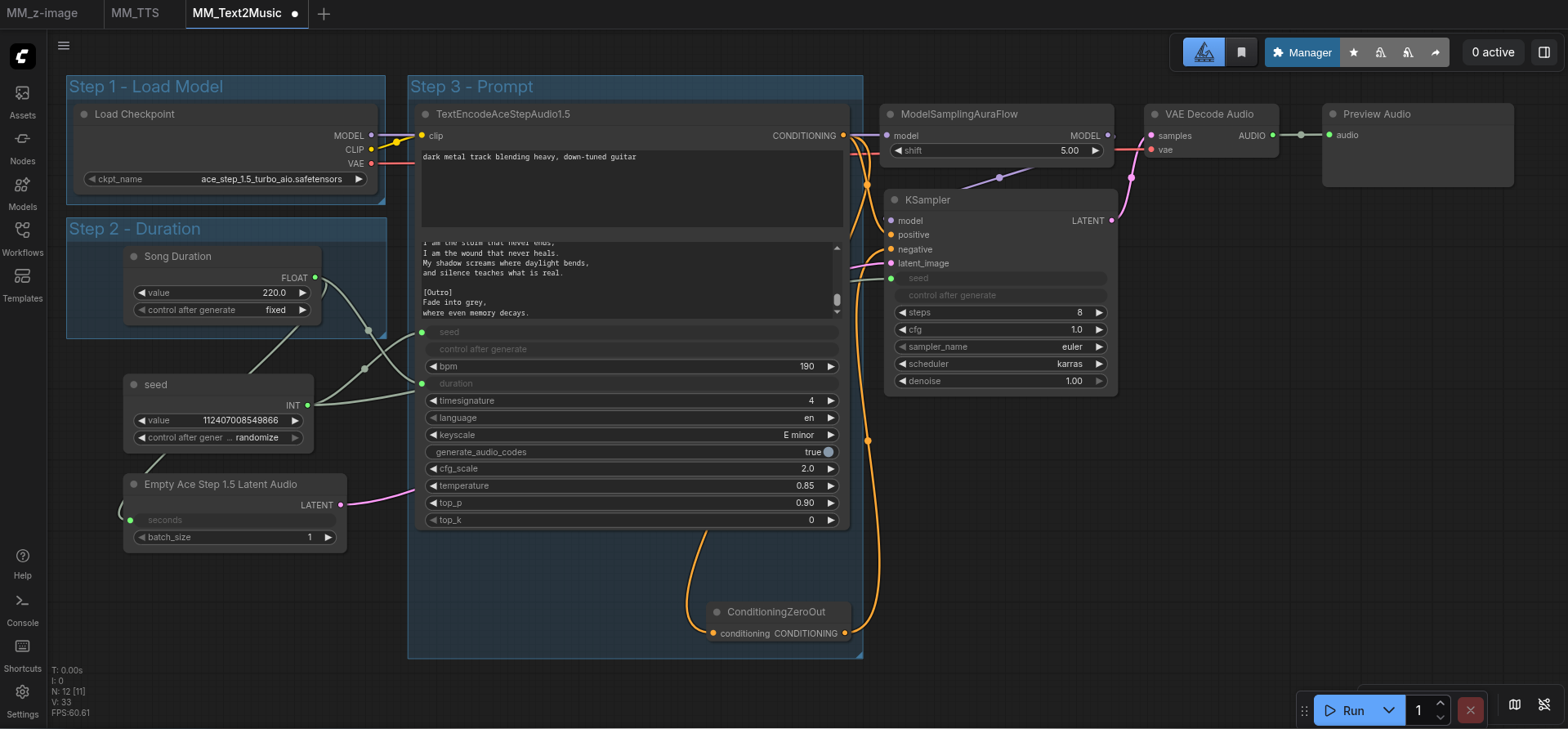
If you want to massproduce songs, you can also use ComfyUI:
 Michael Meister
Conclusion
The ability to host a full music production pipeline locally represents a massive leap forward for open-source AI. By combining a text model for lyrical composition and ACE-Step 1.5 for acoustic synthesis, professional-sounding tracks can be created offline, free of charge, and without copyright filters. The "dark metal" example demonstrates that open-source models are no longer just experimental toys, but capable creative tools ready for deployment.